What to do When GB WhatsApp is Banned?
GB WhatsApp is one of the most popular WhatsApp mods available today. It offers extra features such as advanced privacy controls, custom themes, anti-delete messages, and increased file-sharing limits. However, because it is not an official version of WhatsApp, users may occasionally face account restrictions or bans.
If your GB WhatsApp account has been banned, don’t panic. In most cases, you can restore access to your WhatsApp account by following a few simple steps.
Why Does GB WhatsApp Get Banned?
WhatsApp’s official policy only supports the use of the original WhatsApp application. Since GB WhatsApp is a modified version developed by third parties, it violates WhatsApp’s terms of service.
Common reasons for a ban include:
- Using an outdated version of GB WhatsApp
- Repeatedly sending bulk or spam messages
- Using unofficial WhatsApp modifications
- Receiving multiple user reports
- Suspicious account activity detected by WhatsApp
Depending on the situation, you may receive either a temporary ban or a permanent ban.
How to Fix a Temporary GB WhatsApp Ban
A temporary ban usually displays a countdown timer inside the app. During this period, you cannot send or receive messages.
Step 1: Back Up Your Chats
Before making any changes, create a local backup of your chats. Google Drive Is Not Allowing Access to GBWhatsApp Backup.
- Before making any changes, manually back up your GB WhatsApp files to avoid losing chats and media.
- Open your device’s File Manager.
- Navigate to the GB WhatsApp folder (usually named GBWhatsApp or Android/media/com.gbwhatsapp).
- Copy the entire folder to another location on your device or an SD card.
- Make sure the backup includes the Databases and Media folders.
- This manual backup can help you restore your chats and files if you need to reinstall the app later.
Step 2: Update GB WhatsApp to the Latest Version
Many temporary bans happen because users are running outdated versions.
- Download the latest GB WhatsApp APK.
- Install the update over your existing version.
- Restart your device.
In some cases, updating alone removes the temporary restriction.
Step 3: Wait for the Ban Timer to Expire
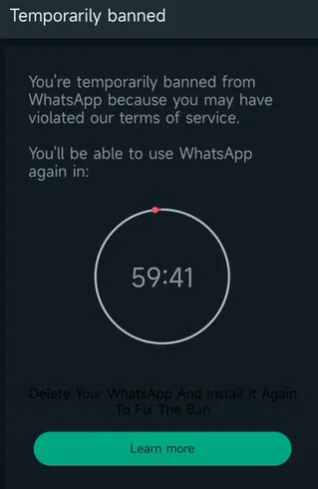
If WhatsApp has applied a temporary suspension, the safest solution is simply to wait until the countdown reaches zero.
Avoid repeatedly logging in and out, as this may trigger additional security checks.
How to Recover from a Permanent Ban
A permanent ban is more serious. You may see a message stating that your phone number is no longer allowed to use WhatsApp.
Option 1: Switch to Official WhatsApp
The most reliable solution is moving back to the official WhatsApp app.
- Back up your GB WhatsApp chats.
- Uninstall GB WhatsApp.
- Install the official WhatsApp.
- Verify your phone number.
- Restore your chat backup if available.
Many users regain account access after switching to the official version.
Option 2: Contact WhatsApp Support
If you believe the ban was applied incorrectly, you can appeal the decision through WhatsApp Support.
When submitting your request:
- Explain your situation clearly.
- Provide your phone number with country code.
- Be polite and concise.
- Avoid sending multiple requests.
Keep in mind that WhatsApp may not reverse all permanent bans.
Option 3: Use a Different Phone Number
If your original number remains permanently restricted, creating a new account with a different phone number may be the only available option.
Be sure to follow WhatsApp’s policies to avoid future restrictions.
How to Avoid Getting Banned Again
To reduce the risk of future bans:
- Always use the latest version of GB WhatsApp.
- Avoid sending spam or bulk messages.
- Do not use automation tools.
- Limit participation in suspicious groups.
- Consider using the official WhatsApp app for maximum account safety.
Is GB WhatsApp Safe to Use?
GB WhatsApp offers many features that users enjoy, but it also comes with risks. Since it is not officially supported by WhatsApp, users may experience temporary bans, security concerns, or compatibility issues.
If account stability is your top priority, the official WhatsApp application remains the safest choice.
Final Thoughts
Getting banned on GB WhatsApp can be frustrating, but most temporary bans can be resolved by updating the app and following the recommended steps. For permanent bans, switching to the official WhatsApp app is usually the most effective solution.
To minimize future issues, keep your app updated, avoid suspicious activity, and always back up your chats regularly.